Getting Started FAQ & Login
Last updated: September 10, 2026
Alright! Moder purchased, contract in hand and we should start onboarding. Maybe even the first system or system change ahead. So what should I prepare for and what next?
Here's a quick one-pager to get you started and what you can download and share with your teammates:
How to log into Moder
When you receive a message from your trainer that a personal Moder has been created for you – you will also receive an invitation email through which you can set your password. It looks like this:
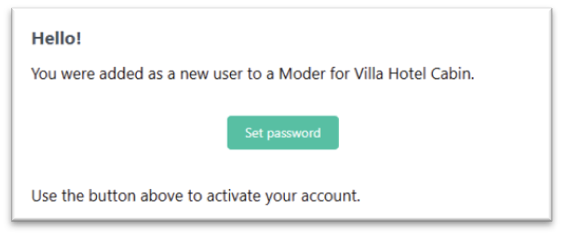
Click Set password button and set a password for yourself.
Please note that the email link is only valid for 60 minutes since the user was created! If you missed the message and can set a password later, request a new link to your email from https://app.moder.fi/forgot-password
When you have successfully added a password to your account, login always from the address https://app.moder.fi/login
Get started efficiently
1. Check the basic information in your Moder
Review your Moderis information and fill in the settings and your company's basic details.
Add possible teammates to Moder - together it's more fun!
2. Start onboarding
Onboarding progresses step by step and you will receive a task list from your trainer, which tells what happens next and how to proceed.
Read the course called Welcome, so you know the flow of the process.
3. Prepare to gather content
Gather the following items in advance, so that entering them into Moder is easier:
Room types and additional services
Activity products, if your business provides them
Price lists and possible seasonal prices
Terms of bookings and cancellations in PDF format
Logo and brand colors
4. Schedule the trainings immediately together with Moder's trainer
You can already contact your Moder trainer and arrange the training. Light onboarding includes one training and Normal onboarding includes three.
5. Stay informed
Learning Lounge and Moder are continuously updated: so carefully follow the instructions and notifications.
Study only the courses relevant to your business – you don't need to study everything in the Lounge.
Remember: We're always here for you, so ask if you don't know. 💜
Frequently Asked Questions
What does "going live" mean in Moder?
Briefly and concisely: we go live when you officially start using Moder. Going live also means that Moder is already set up and you use Moder as a daily tool.
How quickly can I go live, i.e., start using Moder?
Very quickly, if you are also ready yourself. 😊
At its fastest, Moder can be ready in hours, if you accept bookings via booking requests. With payment method integration, Moder can be ready in days, and with OTA channels in about a week. However, implementation often takes 4-6 weeks.
On Moder, we can often start the onboarding process quickly, but sometimes there may be peak times and trainers' calendars fill up quickly.
Moder tip! The faster you study the use of your Moder in the Learning Lounge and spend time on it, the faster you will go live, i.e., start using Moder.
Which courses should I study?
Again briefly: only study the courses here in the Learning Lounge that apply to your business and services. If any course does not apply to you, skip it. Moder is packed full of powerful different features, but the needs of tourism companies are still varied.
How do I add more users to Moder or Learning Lounge?
User setup in Moder
You set the remaining users in Moderi yourself and are responsible for the access rights. Below are instructions on how to add a user from Moderi's Settings:
You can add a new user via the "Add user" button in the top right corner
The window below will open for you:
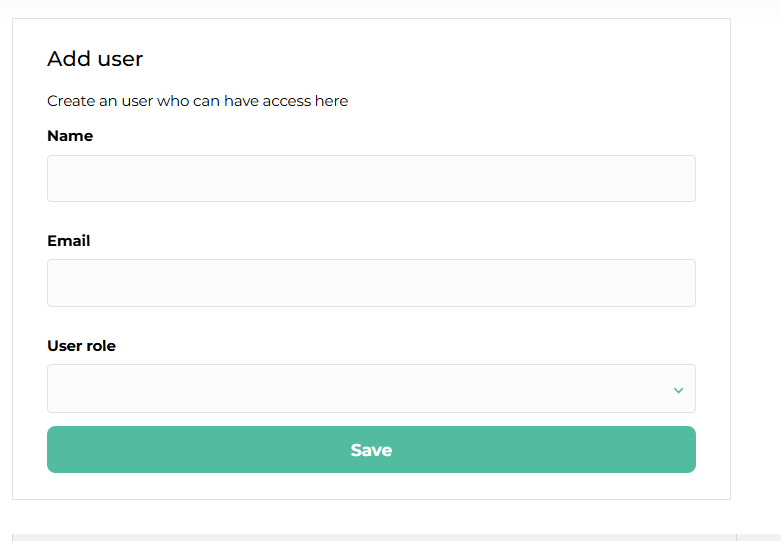
After filling in the new user's role, that user gets their own password link to their email
Adding a user to Learning Lounge
Moder's support adds a user to the Learning Lounge on your behalf. Please clearly state the following items support@moder.fi to the email and if you are an onboarding customer, onboarding@moder.fi
What is the difference between an activity and an add-on service?
We sometimes encounter the question of whether a product should be built more as an activity, or as an add‑on service. In this section we go over these differences and give tips on how to sell them.
Activity – bookable action
An activity is a product that a customer books for a specific time. It can be an hour, a day, or even several. For example:
Sauna session 18–19
Kayak trip 14–16
Yoga class
Equipment rental
An activity has a time, duration and capacity – i.e., how many slots or units are available. The activity is therefore shown in the calendar just like an accommodation reservation.
Tip: If the bookable product has its own schedule, it is probably an activity.
Additional service – extra treat for the reservation
An additional service is a product that is attached to a reservation. It does not itself create its own bookable time, but rather complements another product.
For example:
Breakfast
Linen clothes
Sparkling wine bottle to the room
Late checkout
Additional service is a way to offer the customer more – easily with a single click.
Tip: If the product “added” or “selected” during the reservation, it is an additional service.