8.10.2026: New in Moder: A fresh look and new filters for the Invoices page 🎉
Last updated: October 8, 2026
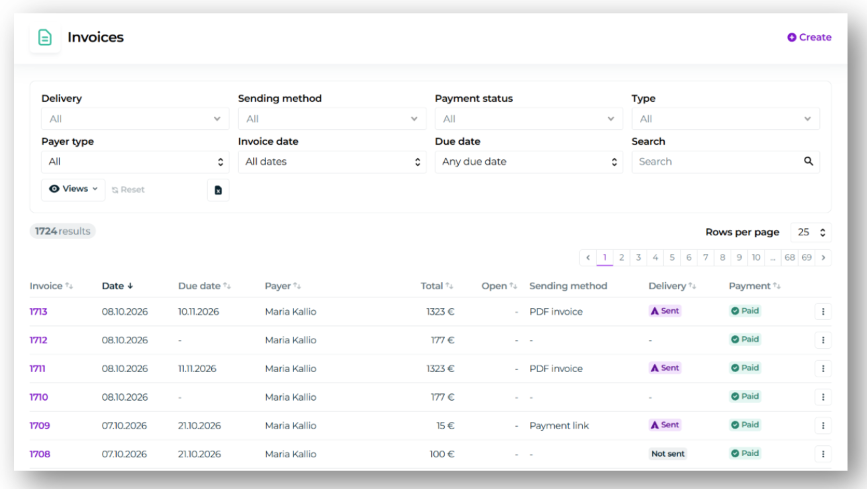
We've completely redesigned the Invoices page in Moder! Along with a fresher and clearer layout, we've introduced a wide range of new filtering options to make finding and managing invoices easier than ever.
New filtering options
You can now filter invoices in more ways than before, including:
Payment status: View paid, unpaid, partially paid, credited or overdue invoices.
Payer type: Filter invoices based on whether the payer is a company or an individual.
Sending method: Find invoices based on how they were sent, such as PDF invoices or payment links. E-invoicing is also already included as a filtering option and will be available in Moder soon!
Delivery status: See which invoices have already been sent and which are still unsent. The filters also include Delivered and Failed statuses, which will become available once e-invoicing is launched.
Save your own views
We've also introduced the familiar option to save your own personal views on the Invoices page, just like in other parts of Moder.
You can now select your preferred filters and save them as a personal view that you can easily return to later. For example, reviewing unpaid or unsent invoices is now quicker, without having to apply the same filters every time.
You can read more about saving views here.
Excel export
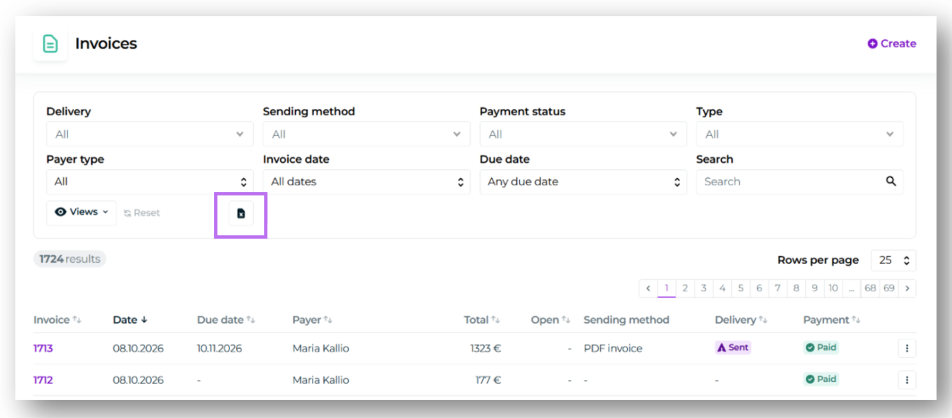
We've also added the option to export your selected invoice view directly to Excel.
The Excel export takes all active filters into account, allowing you to easily export exactly the invoice data you need for further processing or reporting.
To export, simply click the Excel export icon on the Invoices page.
All these improvements are now available to all our customers in Moder! 🎉