Change of sender ID for text messages and registration form
Last updated: May 25, 2026
According to Traficom's order, the SMS sender IDs used by companies (Sender ID) must be approved in advance starting from 4.5.2026. This also applies to text messages sent from Moder and to customers operating in Finland.
Without an approved or registered Sender ID, messages may appear to the recipient as "Unknown." If you wish to continue using your current sender ID, you need to register your details with Traficom.
You can find your current sender ID from your Moder here: Properties -> Select your desired Property from the list -> Scroll down to "SMS settings"
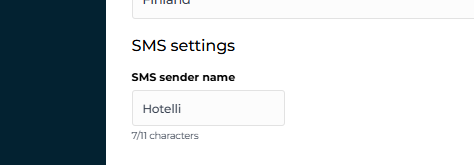
What should you do next?
If you wish, register your Sender ID in Traficom's service, link below (Step 1)
Fill out the Gateway API SMS Sender registration form, instructions, and link below (Step 2)
Step 1: Register your Sender ID in Traficom's service
In Traficom's electronic customer service: https://www.traficom.fi/fi/puhelin-ja-laajakaista/traficomin-myontamat-numerot/hae-sms-sender-id-tunnuksen-rekisterointia
Step 2: Fill out the GatewayAPI SMS Sender ID registration form
How to fill out the form
Moder uses GatewayAPI to send text messages to guests (e.g., regarding check-in and reservations). In Finland, Traficom requires the SMS Sender ID to be registered in advance. Registration ensures that only your company can use the specified sender name.
Detailed instructions for filling out the form:
Sender ID
Enter the company’s registered SMS sender name. This is the name shown as the sender of the SMS. Maximum length is 11 characters.
Contact email / GWAPI account owner email
hello@moder.fi
Message sender: company or organization name
Enter the registered company name.
Message sender: Website
Enter the company’s website.
Is your sender registered with Traficom?
Select Yes.
Primary use case for your sender
Select TRANSACTIONAL.
This applies to messages such as booking confirmations, arrival instructions, accommodation-related notifications, and other operational guest communication.
Secondary use case
Select None, unless the company also uses the same Sender ID for another approved use case.
Tertiary use case
Select None.
Questions?
Where can I get help with registration?
More information, questions, and support: Traficom
Where can I find more information about Sender ID?
Traficom article: https://www.traficom.fi/fi/puhelin-ja-laajakaista/traficomin-myontamat-numerot/sms-sender-id-tunnus
Modem support is also here to help!
Moder Support
+358 50 375 0747
Mon-Fri 9:00-16:00