Insights: Hotel operations
Last updated: September 23, 2026
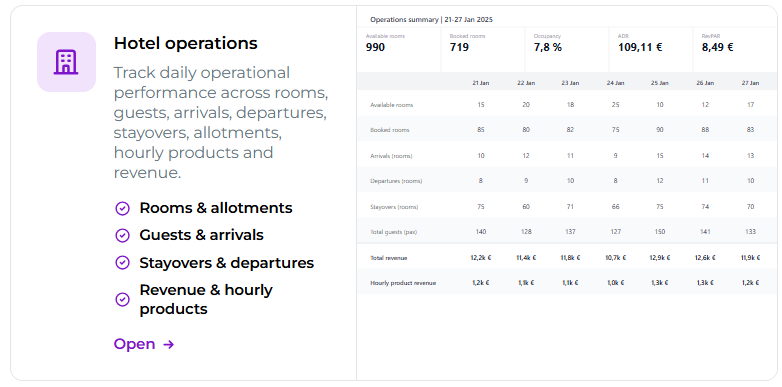
Hotel Operations brings together the most important operational figures for accommodation and hourly-based products in one daily view. It allows you to monitor, for example, room availability, bookings, allotments, arriving and departing guests, activity occupancy rates, as well as sales and revenue.
The view helps you understand both the situation on an individual day and how the figures develop over a longer period.
You can find the view under Analytics > Insights > Hotel Operations.
The Hotel Operations view is available from the Small+ package and upwards.
How to read the Hotel Operations view
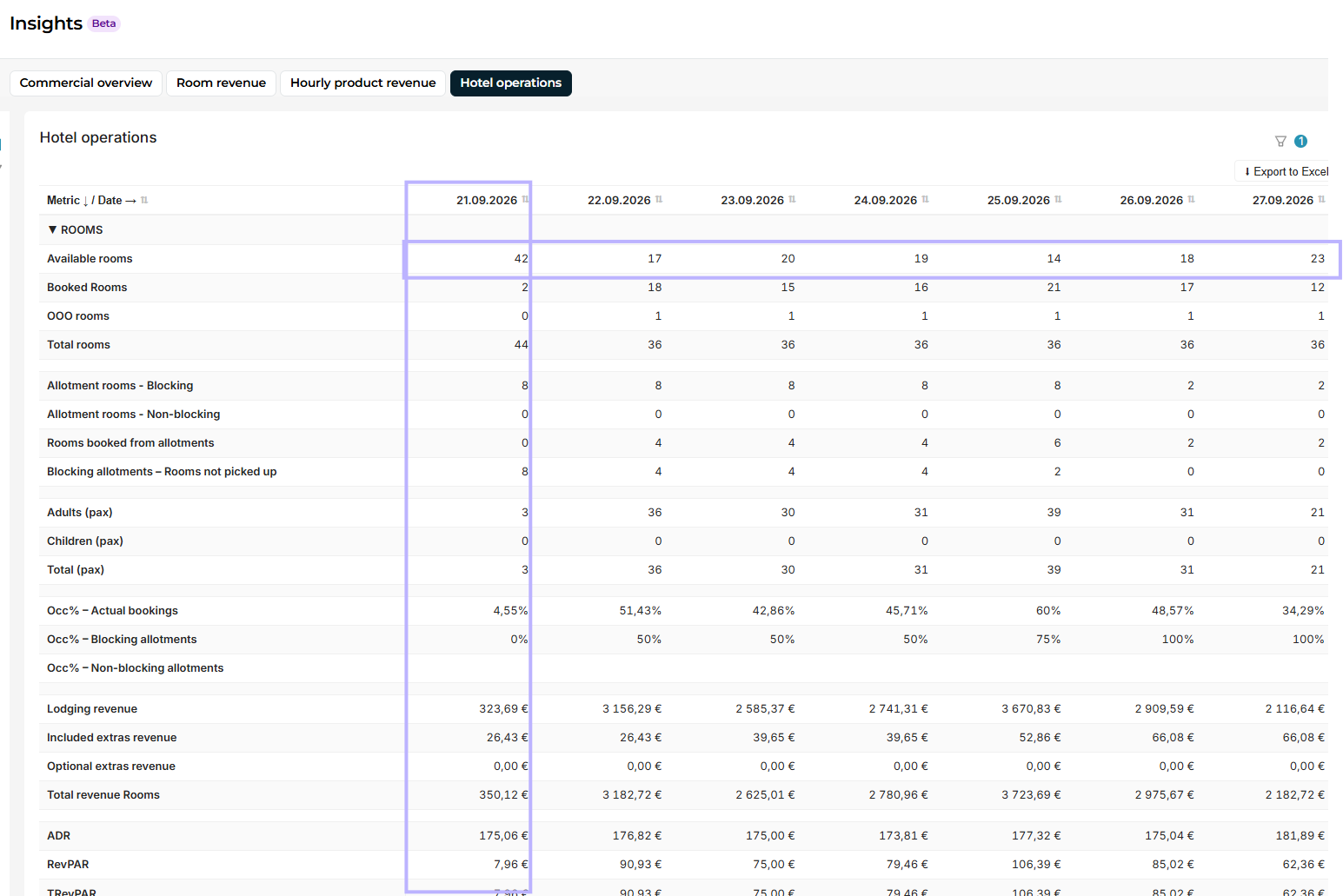
Hotel Operations differs from other Insights views in that the data is presented as a daily table.
One column represents one day and one row represents one key figure over time. You can therefore read the table in two ways:
Look down one column when you want an overview of the situation on a specific day.
Follow one row horizontally when you want to see how a specific figure develops over the period.
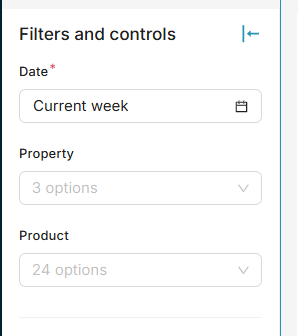
The view's filters allow you to limit the period and other data being examined according to your needs.
Rooms
The Rooms section brings together accommodation capacity, bookings, allotments, guest numbers, occupancy, and revenue.
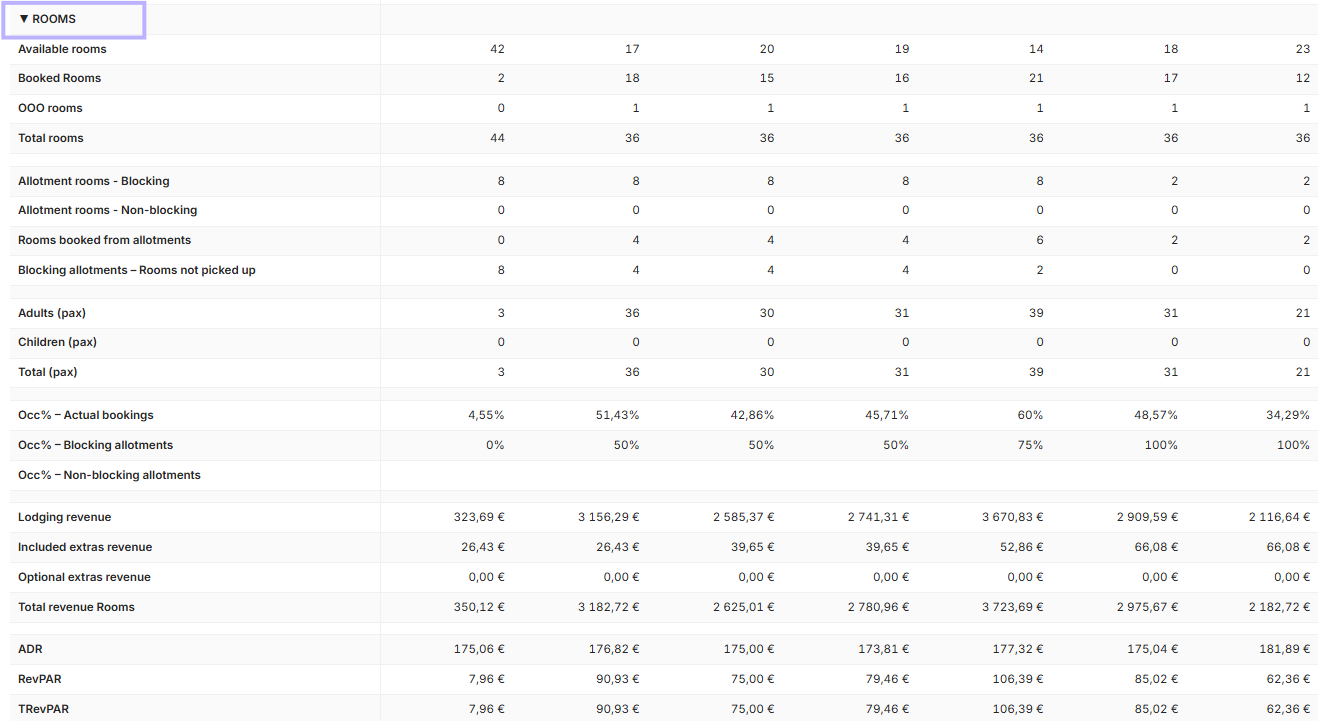
Room capacity
Available rooms – Rooms available
The number of rooms that can be booked on that day but have not yet been booked. Out-of-order rooms are not counted as available rooms.
Booked rooms – Booked rooms
The number of rooms booked for that day. Out-of-order rooms are not counted as booked rooms.
OOO rooms – Out of order
The number of rooms for which an Out of order booking has been made and that are therefore not normally available for sale.
Total rooms – Total rooms
The total room capacity: available, booked, and out-of-order rooms.
Allotments
Allotment figures allow you to monitor how much capacity has been allocated to allotments and how much of it has already been booked.
Allotment rooms – Blocking
The total number of rooms allocated to blocking allotments. The figure includes both rooms that have already been booked and allotment rooms that are still unbooked.
Allotment rooms – Non-blocking
The total number of rooms belonging to non-blocking allotments. Both booked and still-unbooked rooms are included.
Rooms booked from allotments
The number of room bookings made through all blocking and non-blocking allotments.
Blocking allotments – Rooms not picked up
The number of rooms still held in blocking allotments but not yet booked.
This figure can be used, for example, to identify capacity tied up in allotments that has not yet been utilized.
Guest numbers
Guest numbers are based on guests staying on that day, meaning both arriving guests and guests already staying.
Adults (PAX)
The number of adults staying.
Children (PAX)
The number of children staying.
Total (PAX)
The total number of adults and children staying.
Occupancy
Occ% – Actual bookings
Accommodation occupancy, meaning the proportion of booked rooms out of the room capacity available for sale. Out-of-order rooms are not included in available capacity.
Occ% – Blocking allotments
Shows what proportion of the capacity held in blocking allotments has been booked.
Occ% – Non-blocking allotments
Shows what proportion of the capacity belonging to non-blocking allotments has been booked.
By monitoring allotment occupancy rates, you can, for example, see how efficiently the capacity allocated to them is converted into actual bookings.
Accommodation revenue
Lodging revenue
Revenue generated from accommodation sales. Extras are not included in this figure.
Included extras revenue
Revenue from extras included in accommodation bookings.
Optional extras revenue
Revenue from extras purchased separately.
Total revenue Rooms
Total accommodation revenue, including accommodation sales as well as sales of extras included in the price and charged separately.
Accommodation key figures
ADR – Average Daily Rate
The average revenue per booked room. The calculation includes accommodation revenue and extras included in the booking.
RevPAR – Revenue Per Available Room
Revenue per room available for sale. RevPAR helps assess room sales performance by taking into account both revenue and available capacity.
TRevPAR – Total Revenue Per Available Room
Total revenue per room available for sale. In addition to accommodation revenue, this includes both extras included in the booking and separately purchased extra services.
Movement
The Movement section shows the day's arriving, staying, and departing guests and rooms.
It gives you a quick overview of the day's guest traffic and allows you to use the information, for example, when planning reception, housekeeping, and other daily operations.

Arrival rooms
The number of room bookings arriving on that day. Out-of-order bookings are not included.
Arrivals PAX
The total number of adults and children arriving on that day.
Stayover rooms
The number of rooms whose guests are continuing their stay on that day.
Stayover PAX
The total number of adults and children staying in stayover rooms.
Departure rooms
The number of room bookings departing on that day.
Departure PAX
Total number of adults and children departing on that day.
Hourly products
The Hourly products section shows the capacity, bookings, number of guests, occupancy rate, and revenue of hourly products by day.
It allows you to monitor the status of activities and other hourly products for the day in the same operational view alongside accommodation, for example.
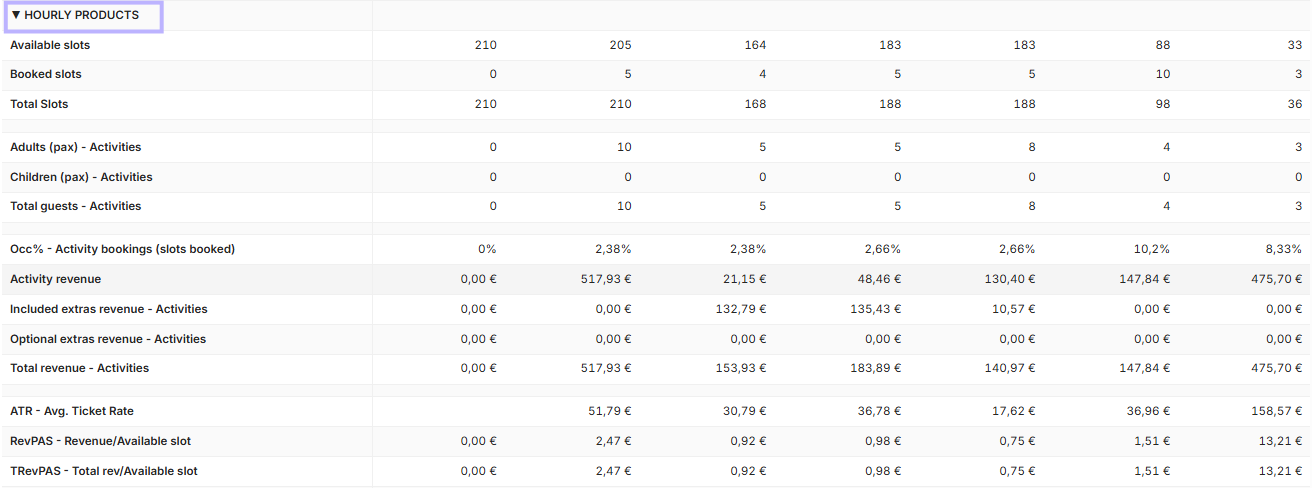
Capacity and bookings
Available slots
The remaining capacity available for booking for hourly products. Capacity is calculated based on the products' open and bookable time and expressed in slots corresponding to the duration of the original product.
Already booked slots are not included in the figure.
Booked slots
Booked capacity expressed in the same way, based on the duration of the original product, as Available slots. This allows the figures to be compared even when different-length virtual products are included.
Total slots
Total capacity, meaning the combined number of available and booked slots.
Activity guest counts
Adults (PAX) – Activities
Total number of adults in activity bookings.
Children (PAX) – Activities
Total number of children in activity bookings.
Total guests – Activities
Total number of adults and children in activity bookings.
Activity occupancy rate
Occ% – Activity bookings (slots booked)
Shows what proportion of the total capacity of hourly products has been booked.
Booked slots / Total slots × 100
Activity revenue
Activity revenue
Revenue generated from actual activity sales. Extras are not included in the figure.
Included extras revenue – Activities
Revenue from extras included in activity bookings.
Optional extras revenue – Activities
Revenue from extras purchased separately in connection with activity bookings.
Total revenue – Activities
Total activity revenue, including revenue from actual activity sales as well as extras included in the price and extras subject to an additional charge.
Activity metrics
ATR – Average Ticket Rate
Average revenue per activity guest. The calculation includes activity revenue and extras included in the booking.
RevPAS – Revenue Per Available Slot
Revenue per available slot. The calculation includes activity revenue and extras included in the booking in relation to total capacity.
TRevPAS – Total Revenue Per Available Slot
Total revenue per available slot. In addition to activity revenue, this includes both extras included in the booking and extras purchased separately
Totals
At the end of the view, you will also find the key totals.

Total guests – Rooms
Total number of guests staying overnight, i.e. the same figure as Total PAX in the Rooms section.
Total Revenue
Combined total revenue from accommodation and hourly products.
Export data to Excel
You can export the data from the Hotel Operations view to Excel for further processing.
An Excel export is useful, for example, when you want to create your own calculations or reports, examine a longer period, or combine Hotel Operations data with other data of your own.

Summary
Check the daily status of accommodation and activities.
Monitor room capacity, bookings, and allotments.
Anticipate the number of arriving, staying, and departing guests.
Review occupancy, revenue, and the key metrics.
Monitor the capacity and sales of hourly products.
Export data to Excel for more detailed analysis.