5.5.2026: New in Moder – Collect dietary requirements and allergy information directly from the webshop
Last updated: May 5, 2026
You can now collect guests’ allergy and special dietary information directly through the webshop booking form in Moder.
You can activate the feature for a main product (activity or accommodation) or an extra service. This adds a required field to the Guest details form, where the guest provides their allergies or dietary requirements. Alternatively, they can select “I have no allergies or dietary requirements.”
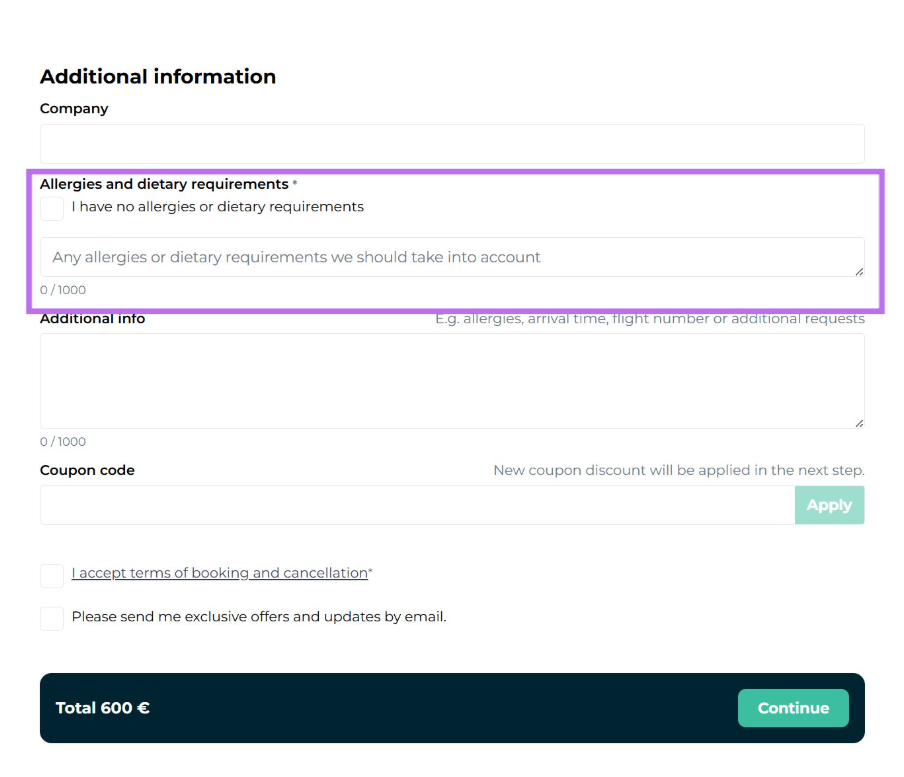
How to activate the feature for a main product (accommodation or activity)
In Moder, go to Products → Product Catalog → Edit product → on the first page, tick “Ask for allergies and dietary requirements.”
How to activate the feature for an extra service
In Moder, go to Products → Extra Service → Edit extra service → and tick the box “Ask for allergies and dietary requirements.”
Where is the information shown?
The information provided by the guest is saved in the booking’s Operational notes field.
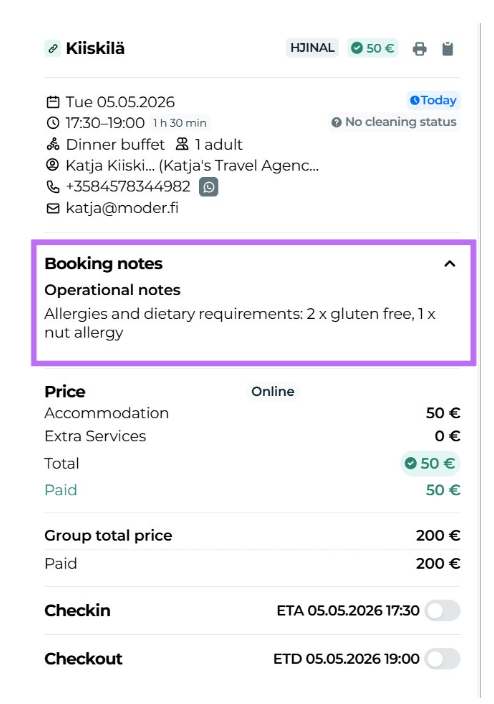
This field is visible in the following daily operations views:
Stay Operations
Extras Calendar
Activity Operations (including print view and slot manifest)
With this feature, you ensure that important dietary information is always easily accessible in daily operations.