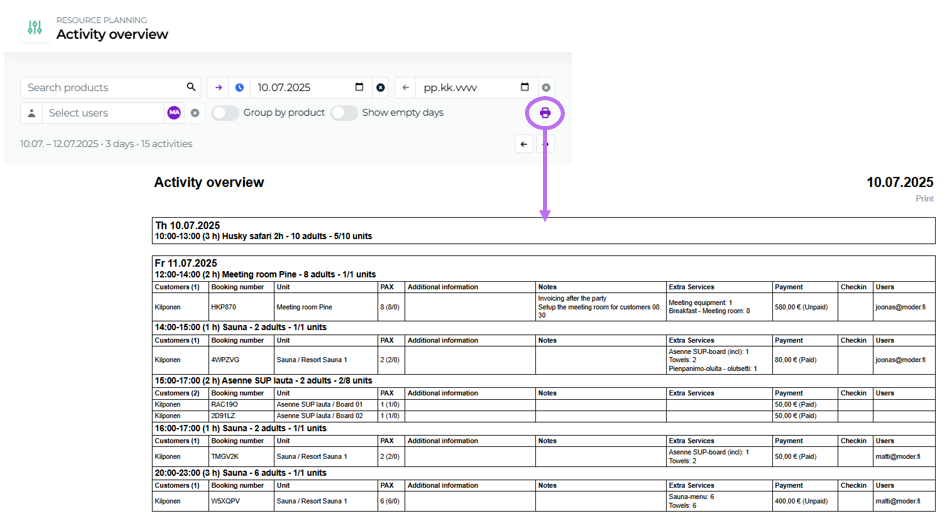
16.6.2025 Activity daily view printout and cleaning list filters
Last updated: January 12, 2026
The cleaning list can now be reorganized using filters!
Organize the cleaning list for workflow management into the shape you want now with easy filter selections. Do you want to see only dirty rooms, or only the rooms of a single location? Now it is possible:

Cleaning status From this section you can filter by cleaning status, e.g., view only cleaned, inspected, dirty, or out‑of‑service rooms.
Properties From this section you can filter the cleaning list by location.
Product types in this section the default is accommodation, but you can also switch to activities.
Categories you can view, for example, only meeting rooms, apartments, or event spaces.
Room types you can select the rooms types to inspect manually, even one at a time.
Booking status you can select arriving, departing, or stay‑over reservations.
Day view printing has been added to the activity view of operation management.
Select a period, optionally group by product or also show empty days, after which clicking the printer icon will give you a printable list of activity reservations for students or for shift planning.
Key Features:
Select a time range for the printout
Assign employees to desired experiences or activities
Expand your desired reservations using the arrow if you want detailed information from the reservation for the printout
Customer names
Booked additional services
Notes