7.8.2026: Moder weekly update – Booking-specific purchase price editing for margin scheme products and login landing page update
Last updated: August 7, 2026
Editing the purchase price of a margin scheme product on a booking
You can now edit the purchase price of a margin scheme product – an activity, accommodation, or extra service – directly on the booking when needed. This enables more flexible use of the margin scheme in situations where the purchase price needs to be adjusted for a specific booking.
How to edit the purchase price:
Open the booking where you want to edit the purchase price and click Edit.
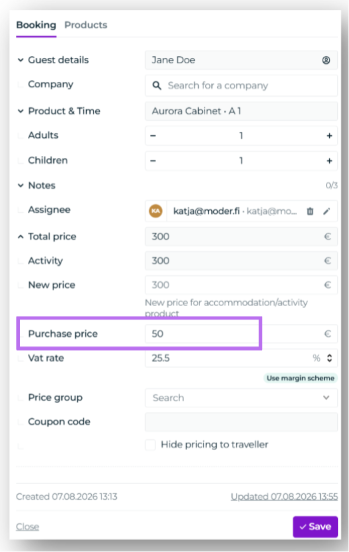
If the product settings use a Unit purchase price type of purchase price, you can edit the purchase price directly under the Booking tab in the editing window.
If the product settings use adult and child purchase price types of purchase prices, go to the Products tab and click the row of the product you want to edit. You can then edit the price and purchase price of adult and child.
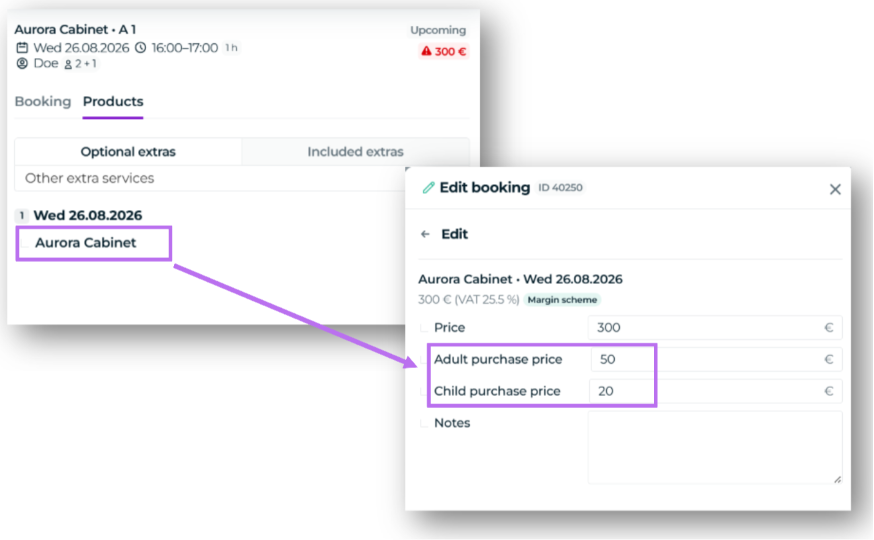
The purchase price of extra services can be edited under the Products tab in the editing window.
Please note: The purchase price must be edited on the booking and cannot be edited on the invoice. You can edit the purchase price until an invoice draft has been created for the booking. Creating an invoice draft or invoice locks the purchase price, after which it can no longer be edited on the booking.
Login landing page update
Last week, we changed the view that opens after logging in to Moder. Previously, users were directed to the bookings calendar, but now the bookings list opens by default.
This change was made to improve Moder's performance and applies to all our customers.